




Introduction
DDR (Double Data Rate) memory is used to store data that a computer needs for active tasks. Each new DDR generation brings changes in speed, power use, and memory design.
DDR3, DDR4, and DDR5 are three important generations of DDR memory. However, they are not interchangeable. Each generation supports different hardware platforms and offers different levels of performance.
This guide compares DDR3, DDR4, and DDR5 in terms of speed, voltage, capacity, design, compatibility, and practical use. It also explains how to choose the right type for your system or upgrade project.
Overview of DDR3, DDR4, and DDR5
DDR3
DDR3 was introduced in 2007. It was widely used in older desktop computers, laptops, and other electronic systems.
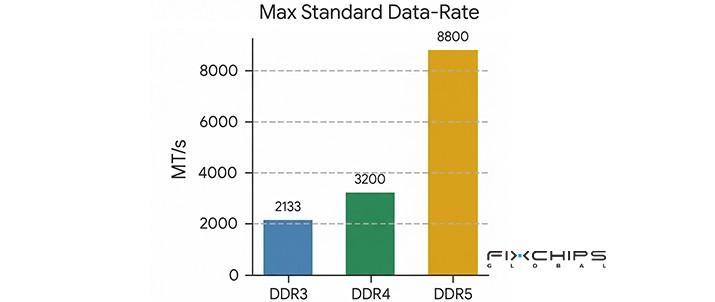
DDR3 commonly operates at data rates from 800 to 2133 MT/s. Standard DDR3 uses 1.5V, while DDR3L uses a lower voltage of 1.35V. Although DDR3 is now an older technology, it can still meet the needs of some basic systems.

DDR4
DDR4 began to replace DDR3 in mainstream computers around 2014. It offers higher data rates, lower operating voltage, and improved memory efficiency.
DDR4 commonly operates at 1600 to 3200 MT/s under standard data-rate ranges. It uses 1.2V and is found in many desktop computers, laptops, and workstations. It remains a practical choice for systems that support this generation.

DDR5
DDR5 entered the market in 2020. It was designed to support higher memory bandwidth, greater memory density, and improved power management.
DDR5 starts at 4800 MT/s in its standard data-rate range and uses 1.1V. It also introduces on-module power management and two independent 32-bit subchannels per standard 64-bit module interface. These changes help support modern systems that need to move more data at once.

Key Differences Between DDR3, DDR4, and DDR5
DDR3, DDR4, and DDR5 differ in more than speed. Their voltage, module design, and internal architecture also affect performance and compatibility.
DDR3 vs DDR4 vs DDR5 Comparison Table
|
Feature |
DDR3 |
DDR4 |
DDR5 |
|
Introduction |
2007 |
2014 |
2020 |
|
Standard data-rate range |
800–2133 MT/s |
1600–3200 MT/s |
Starts at 4800 MT/s |
|
Standard voltage |
1.5V |
1.2V |
1.1V |
|
Bandwidth |
6400-17066 MB/s |
12800-25600 MB/s | 12800-25600 MB/s |
|
Max Module Capacity |
16GB |
64GB |
128GB+ |
|
Desktop DIMM pins |
240 |
288 |
288 |
|
Laptop SO-DIMM pins |
204 |
260 |
262 |
|
Power management |
Motherboard |
Motherboard |
Power management IC on the module |
|
Memory channel design |
Traditional channel design |
Traditional channel design |
Two 32-bit subchannels per standard 64-bit module interface |
| Cost | Low | Medium | Higher |
| Typical Uses | Older PCs, industrial equipment | PCs, servers | High-performance PCs, AI systems, data centers |
Data Rate and Bandwidth
The most visible difference among the three generations is memory data rate.
- DDR3 typically runs at lower data rates than DDR4.
- DDR4 increases the amount of data that can be transferred each second.
- DDR5 starts at a higher standard data rate and supports further increases.
Higher data rates can improve memory bandwidth. This is useful when a system must move large amounts of data, such as in multitasking, content creation, and data-intensive computing.
Voltage and Power Efficiency
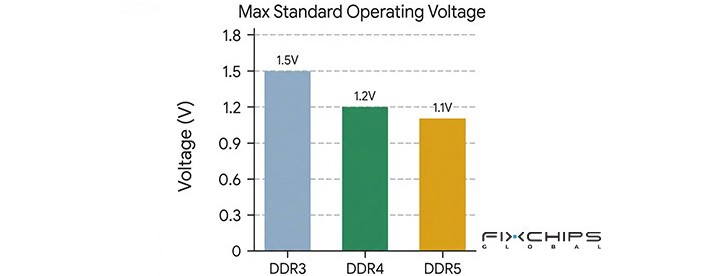
- DDR3 standard memory uses 1.5V, while DDR3L uses 1.35V.
- DDR4 lowers the standard voltage to 1.2V.
- DDR5 lowers it further to 1.1V.
Lower voltage can reduce the power needed for memory operation. This can be helpful in systems that run for long periods or have limited power budgets.
DDR5 also moves key power management functions onto the memory module. This changes how power is managed compared with DDR3 and DDR4, where the motherboard handles more of this work.
Voltage alone does not determine total power use. Memory capacity, data rate, workload, and module design also matter.
Capacity and Memory Density
Memory density refers to how much data a memory chip can store. Newer DDR generations support advances in chip density and module design, making larger memory configurations possible.
DDR3 is mainly found in older systems with more limited memory support. DDR4 supports a wider range of capacities for mainstream computers and workstations. DDR5 is designed to support higher memory density and larger memory configurations on compatible platforms.
Architecture and Design Improvements
Each generation changes the way memory transfers and manages data.
- DDR3: Provides the foundation for older computer memory systems and supports the needs of many basic computing tasks.
- DDR4: Improves data rates and reduces standard operating voltage compared with DDR3.
- DDR5: Adds two independent 32-bit sub-channels to a standard 64-bit module interface. It also uses on-module power management and supports higher data rates.
These design changes help DDR5 serve newer systems that need greater memory bandwidth and capacity. Still, the benefits depend on whether the CPU and other hardware can make use of them.
Physical Design and Compatibility
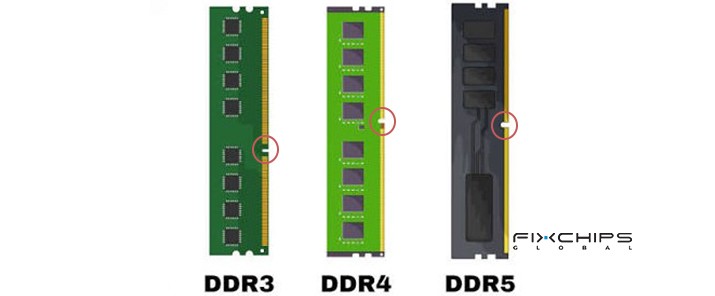
DDR3, DDR4, and DDR5 memory modules have similar basic shapes, but their physical designs are different. The main differences include pin count, notch position, and module power design.
- DDR3: Uses 240-pin desktop DIMMs and 204-pin laptop SO-DIMMs. Its notch position matches DDR3 memory slots.
- DDR4: Uses 288-pin desktop DIMMs and 260-pin laptop SO-DIMMs. Its notch position and electrical design differ from DDR3.
- DDR5: Uses 288-pin desktop DIMMs and 262-pin laptop SO-DIMMs. It has a different notch position from DDR4 and includes an on-module power management IC (PMIC).
These differences prevent DDR3, DDR4, and DDR5 memory modules from being used interchangeably. Even though desktop DDR4 and DDR5 DIMMs both have 288 pins, their notch positions and electrical designs are different. Always check the motherboard specifications before choosing a memory module.
Major DDR3, DDR4, and DDR5 Manufacturers
Several major memory manufacturers have developed DDR memory products across different generations. Their product portfolios may include DRAM chips for electronic devices and memory modules for computers or servers.
Samsung
Samsung is a major DRAM manufacturer that offers DDR memory products for different computing needs. Its DDR portfolio includes DDR4 and DDR5, with products designed for applications such as PCs, workstations, and servers.
Samsung's DDR5 memory supports higher data rates and capacities than its DDR4 products. Its official product information also lists DDR4 and DDR5 operating voltage specifications.
SK hynix
SK hynix is another major memory semiconductor manufacturer. Its DRAM products serve a range of computing and data-processing applications.
The company has developed both DDR4 and DDR5 memory technologies. Its memory products focus on data transfer speed, capacity, and power efficiency, making them relevant to consumer computers and enterprise systems.
Micron
Micron supplies DRAM components and memory modules for consumer, industrial, and enterprise applications. Its product portfolio includes DDR4 and DDR5 memory, as well as legacy DRAM products for older designs.
This legacy support is relevant when replacing DDR3 memory in existing equipment. However, buyers should confirm the availability and current production status of a specific DDR3 part before placing an order.
Applications of DDR3, DDR4, and DDR5
Different DDR generations suit different hardware platforms. The best choice depends on system compatibility, performance needs, and upgrade costs.
Common Applications of DDR3
DDR3 is mainly used in older computers and electronic systems. It may still be suitable when replacing memory in a working legacy system.
Common applications include:
- Older desktop computers and laptops
- Basic office computers used for simple tasks
- Older industrial computers and embedded systems
- Legacy equipment that requires DDR3-compatible memory
For these systems, DDR3 can be a cost-effective replacement when the existing hardware still meets performance needs.
Common Applications of DDR4
DDR4 remains useful in many mainstream computing systems. It offers a balance between performance, power use, and cost.
Common applications include:
- Desktop computers for office work and daily use
- Laptops that support DDR4
- Gaming PCs built on DDR4 platforms
- Workstations for general business and creative tasks
- Industrial computers that use DDR4 memory
DDR4 can be a practical option for users who want to upgrade an existing compatible system without replacing the entire platform.
Common Applications of DDR5
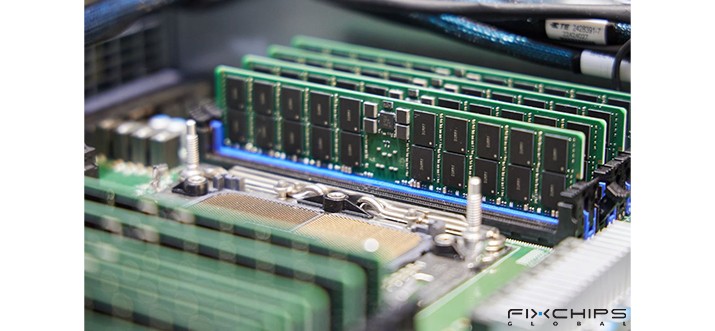
DDR5 is designed for newer platforms that need higher memory bandwidth and support for larger memory configurations.
Common applications include:
- New desktop computers and laptops with DDR5 support
- Gaming systems built on compatible platforms
- Workstations used for video editing and 3D work
- Systems that handle large datasets
- High-performance computing platforms that support DDR5
DDR5 is often a better fit for new systems designed around current memory standards. However, its advantages depend on the workload and the rest of the hardware.
How to Choose Between DDR3, DDR4, and DDR5
The right memory type is not always the newest one. Before making a purchase, consider the following factors.
1. Check System Compatibility
Compatibility should be the first consideration. A motherboard supports specific memory generations, and DDR3, DDR4, and DDR5 modules cannot be used interchangeably.
Check the motherboard manual and CPU specifications before ordering. Confirm the supported DDR generation, module type, capacity, and data rate.
For business buyers, checking these details before purchasing can help avoid incorrect orders and unnecessary returns.
2. Compare the Total Upgrade Cost
DDR3 may be the most reasonable option when an older system only needs a memory replacement.
DDR4 may offer a balanced upgrade path when the existing platform supports it.
Moving to DDR5 may require a compatible motherboard and CPU, not just new memory.
The total cost of changing platforms should be considered before deciding whether the performance gains justify the expense.
3. Match Memory to Performance Needs
- For basic office tasks, web browsing, and simple applications, a compatible DDR3 or DDR4 system may still perform well.
- For demanding games, content creation, and data-intensive workloads, DDR4 or DDR5 may offer more bandwidth and capacity options. The actual benefit depends on the application and the system configuration.
Do not choose memory based on data rate alone. Capacity, latency, CPU performance, and software requirements can also affect the result.
4. Consider Future Upgrades
If you are building a new computer, consider the platform's upgrade options.
l A DDR5-compatible platform may provide more room for future memory upgrades, depending on the motherboard and CPU.
l For an existing DDR4 system, adding compatible DDR4 memory may be more economical than replacing the whole platform.
Advantages and Disadvantages of DDR3, DDR4, and DDR5
|
DDR Type |
Advantages |
Disadvantages |
|
DDR3 |
|
|
|
DDR4 |
|
|
|
DDR5 |
|
|
Conclusion
DDR3, DDR4, and DDR5 differ in data rate, operating voltage, architecture, and hardware compatibility. DDR3 is mainly relevant to older systems. DDR4 remains a practical choice for many compatible computers, while DDR5 offers higher standard data rates and new design features for newer platforms.
The best option depends on the system and its intended use. For a memory replacement, compatibility should come first. For a new computer, compare the total platform cost, required performance, and future upgrade plans before making a decision.
Frequently Asked Questions
What are the main differences between DDR3, DDR4, and DDR5?
The main differences are data rate, voltage, memory design, and platform compatibility. DDR4 generally offers higher data rates and lower standard voltage than DDR3, while DDR5 introduces higher starting data rates, on-module power management, and two 32-bit subchannels per standard 64-bit module interface.
Does DDR5 make a computer faster than DDR4?
DDR5 can provide higher memory bandwidth, which may help applications that depend on fast data transfer. However, the improvement varies by workload, CPU, memory configuration, and software. Some tasks may show only a small difference.
Is DDR3 still worth using?
DDR3 can still be useful for maintaining older computers and compatible industrial systems. It may be a sensible choice when the system meets current needs and only requires a memory replacement. For a new computer build, a newer supported platform is usually more practical.
Does DDR5 use less power than DDR4?
DDR5 has a lower standard operating voltage of 1.1V, compared with 1.2V for DDR4. However, voltage alone does not determine total power consumption. Data rate, capacity, workload, and module design also affect power use.
Is DDR5 better for gaming than DDR4?
DDR5 can benefit gaming systems when the game and platform make good use of its memory bandwidth. The actual performance difference depends on the CPU, graphics card, game, resolution, and memory configuration. A well-balanced DDR4 system may still provide strong gaming performance.
Can I upgrade a DDR4 computer to DDR5 memory?
Not by replacing the memory module alone. DDR4 and DDR5 are not interchangeable, so the motherboard must support DDR5. Depending on the platform, upgrading may also require a compatible CPU and other hardware changes.
Related Articles


