




Introduction
Storage affects how quickly an electronic device starts, opens applications, and saves data. For many compact devices, eMMC is a practical way to store software and user files without adding a separate storage drive.
This article explains how eMMC works, the factors that affect its performance and lifespan, and the differences between eMMC, SSD, and UFS. It also covers consumer and industrial eMMC, common limitations, and key points to consider when selecting eMMC for an electronic device.
What Is eMMC?
eMMC stands for Embedded MultiMediaCard. It is an embedded storage solution that combines NAND flash memory and a controller in a single package.

Unlike a removable memory card, eMMC is usually soldered directly onto a device's circuit board. This makes it suitable for products that need compact, built-in storage.
The main purpose of eMMC is to store data that must remain available when the device is powered off. This can include the operating system, applications, settings, and user files.
Its integrated design also reduces the need for the host processor to manage NAND flash directly. This helps simplify system design and can save valuable board space.
How Does eMMC Work?
Main Component
An eMMC device has three main parts. Each part supports a different stage of the storage process.
|
Component |
Main Role |
|
NAND flash memory |
Stores data even when power is removed |
|
Flash controller |
Manages data storage, error correction, and memory wear |
|
Host interface |
Transfers commands and data between eMMC and the host system |
Working Principle
eMMC works by receiving commands from the host processor and using its built-in controller to manage the requested operation.
The process is straightforward:
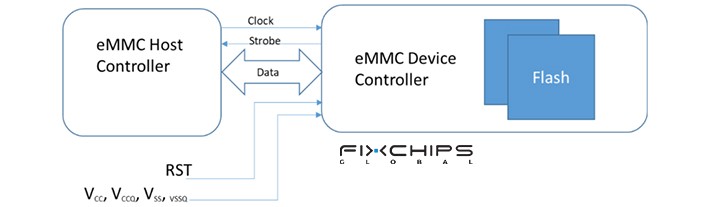
When writing data:
1. The host processor sends a write command.
2. The eMMC controller receives the command and manages where the data should be stored.
3. The controller programs the NAND flash and manages the related storage operations.
When reading data:
1. The host processor requests stored data.
2. The controller finds and retrieves the required data from NAND flash.
3. The eMMC sends the data back to the host system.
The controller also manages functions such as error correction and wear leveling. As a result, the host does not need to control every detail of the NAND flash directly.
What Affects eMMC Performance and Service Life?
Not all eMMC products deliver the same results. Before choosing a device, consider the following factors.
Interface version
Different eMMC generations support different interface features and data-transfer modes. For example, eMMC 5.0 supports the HS400 interface mode, which has a theoretical maximum interface bandwidth of 400 MB/s.
eMMC Generations Performance Comparison
|
eMMC Version |
Release Year |
Maximum Theoretical Interface Bandwidth |
Key Performance Improvements |
|
eMMC 4.4 |
2009 |
Up to 104 MB/s |
Introduced DDR data transfer to improve interface speed. |
|
eMMC 4.5 |
2011 |
Up to 200 MB/s |
Added HS200 mode, increasing the interface bandwidth. |
|
eMMC 5.0 |
2013 |
Up to 400 MB/s |
Introduced HS400 mode for higher data transfer rates. |
|
eMMC 5.1 |
2015 |
Up to 400 MB/s |
Added command queuing and other features to improve data handling and reliability. |
Note: This figure describes interface capability, not guaranteed real-world read or write speed. Actual performance also depends on the memory, controller, system design, and workload.
NAND flash and controller design
The NAND flash stores the data, while the controller manages access to it. Their design can affect read and write performance, endurance, and data management.
Two products with the same interface version may still perform differently.
Workload and write frequency
A device that mainly reads data may place different demands on its storage than one that frequently writes logs, updates files, or records data.
Repeated writes and erases contribute to NAND wear. Capacity, memory type, workload, temperature, and the controller's management functions can all affect service life.
Operating environment
Temperature and power conditions matter, especially in industrial equipment. Always check the specified operating range and reliability features of the exact product rather than assuming all eMMC devices support the same conditions.
eMMC Types
eMMC can be grouped to consumer eMMC and industrial eMMC. They share the same basic storage concept. Their target applications, however, may have different requirements.
Consumer products often focus on balancing capacity, power use, performance, and cost. Industrial products may place greater emphasis on operating temperature, endurance, device monitoring, and long-term availability.

|
Feature |
Consumer eMMCs |
Industrial eMMCs |
|
Capacities |
Typically 4GB–256GB |
Typically 4GB–128GB |
|
Operating Temperature |
0°C to +70°C |
-40°C to +85°C |
|
SMART Monitoring |
Basic health indicators depending on eMMC version |
Extended monitoring depending on vendor implementation |
|
NAND Flash |
Commonly TLC or QLC NAND optimized for cost and density |
Typically MLC or high-endurance TLC NAND optimized for reliability and endurance |
|
Endurance |
Around 1,000–3,000 program/erase cycles |
Around 3,000–10,000+ program/erase cycles |
|
Speed |
Up to HS400 mode |
up to HS400 mode |
|
Lifecycle Support |
Typically 3–5 years product availability |
Typically 5–10+ years long-term supply and support |
|
Cost |
Lower cost per GB |
Higher cost |
How to Choose eMMC for an Embedded Device
Use the following steps to narrow down your options.
Step 1: Estimate the required capacity
Calculate the space needed for the operating system, applications, user data, and future updates. Leave sufficient room for normal operation and data growth.
Step 2: Confirm host compatibility
Check the processor or system-on-chip specifications. Confirm the supported eMMC version, interface mode, package requirements, and electrical characteristics.
Step 3: Evaluate read and write needs
Consider how the device uses storage. A system that mainly loads software may have different needs from one that records data continuously. Compare measured performance under workloads similar to your application when possible.

Step 4: Check endurance and environment
Review the product's endurance information, operating-temperature range, and data-protection features. For industrial equipment, consider whether the device must operate for long periods or withstand frequent writes.
Step 5: Confirm supply and product lifecycle
For commercial and industrial projects, storage availability matters beyond the first purchase. Ask the supplier about product status, expected availability, documentation, and possible replacement options.
A suitable eMMC device should meet the system's technical requirements without adding unnecessary cost or complexity.
Common eMMC Limitations to Consider
eMMC offers compact integration, but it also has limits.
- Performance ceiling: Some demanding applications may need a faster storage solution.
- Limited upgrade options: Since eMMC is usually soldered to the circuit board, replacing or upgrading it is not as simple as changing a removable drive.
- Finite write endurance: NAND flash wears over time. Actual service life depends on the device and workload.
- Model-specific features: Security functions, monitoring tools, and operating-temperature ranges are not identical across all products.
- Host compatibility: The system must support the selected storage interface and package.
eMMC vs. SSD vs. UFS
eMMC, SSD, and UFS all support data storage, but they are designed for different system needs. The best choice depends on the device's performance requirements, space limits, and cost target.

|
Feature |
eMMC |
SSD |
UFS |
|
Typical design |
Embedded storage in one package |
Usually a separate storage drive or module |
Embedded storage designed for mobile and compact systems |
|
Common applications |
Tablets, smart TVs, embedded controllers |
Laptops, desktops, and higher-capacity storage systems |
Smartphones and other performance-focused mobile devices |
|
System integration |
Compact and straightforward |
Depends on drive type and host interface |
Designed for integration into compatible embedded systems |
|
Performance |
Suitable for moderate storage needs |
Often offers higher performance |
Designed for higher-performance mobile storage |
|
Main selection focus |
Cost, space, and sufficient performance |
Capacity, performance, and system compatibility |
Mobile performance and host compatibility |
Conclusion
eMMC provides compact, integrated storage for many consumer and embedded products. Its built-in controller simplifies data management, while its small package helps save circuit-board space.
However, selecting eMMC requires more than checking capacity or interface version. Performance, endurance, operating conditions, compatibility, and product availability all matter. Comparing these factors against the needs of the actual application is the best way to make an informed choice.
Frequently Asked Questions
What Does eMMC Stand For, and How Does It Work?
eMMC stands for Embedded MultiMediaCard. It combines NAND flash memory and a controller in one package, allowing the host processor to read and write data through a standardized interface.
Is eMMC still a practical storage option today?
Yes. eMMC remains useful in devices with moderate storage and performance requirements, including tablets, smart TVs, and embedded systems. The right choice depends on the product's workload, cost target, and system design.
How does eMMC differ from an SSD?
Both use NAND flash memory, but they differ in design and integration. eMMC combines flash memory and a controller in one embedded package, while an SSD is generally a separate drive or module designed for a compatible storage interface.
What determines how long eMMC will last?
Its service life depends on factors such as NAND type, capacity, write frequency, workload, temperature, and controller management. Check the specific product's endurance information instead of relying on one lifespan estimate for all eMMC devices.
Can eMMC be upgraded?
In most devices, eMMC is soldered to the circuit board, so a user cannot upgrade it as easily as a removable drive. Whether replacement is possible depends on the hardware design, repair process, and system compatibility.
How can I find out whether my device uses eMMC?
Start with the device's technical specifications or service documentation. If these do not identify the storage type, consult the manufacturer or check the hardware documentation for the specific model.
Related Articles


